Skip to content
TradeCore logoTRADECOREPLAN | MANAGE | DELIVER
HomeFeaturesHow it worksPricingAbout
Customer loginStart free trial
HomeFeaturesHow it worksPricingAboutWho It’s ForCustomer LoginStart Free Trial
Flooring fitter installing a wood floor in a home
TradeCore logoTRADECOREPLAN | MANAGE | DELIVER
HomeFeaturesHow it worksPricingAbout
Customer loginStart free trial
HomeFeaturesHow it worksPricingAboutWho It’s ForCustomer LoginStart Free Trial
Home›Who it’s for›Flooring Contractors

Flooring Contractors

Keep your flooring jobs on track.From preparation to final finish.

TradeCore helps flooring contractors manage jobs, rooms and work areas, keep their team on schedule and store photos, notes and job records — from subfloor preparation through to the finished floor.

Start free trial See how it works

30 days free · No card required

  • Keep jobs on track
  • Manage your team
  • Maintain job records

Key benefits

Built for the way you work.

Job management software for flooring contractors. Everything you need to manage your flooring jobs, team and paperwork — without the spreadsheets, group chats and missed information.

Manage all your jobs

From single rooms and domestic properties to larger commercial projects.

Allocate your team

Assign fitters to the right jobs, rooms or work areas.

Track progress with photos

Record preparation, installation and finished-work evidence.

Job records & paperwork

Keep notes, drawings, product information and important documents together.

Schedules & visits

Plan preparation, installation, return visits and finishing work.

Timesheets, worker invoices & pricework

Manage day work, pricework, worker invoices and approvals in one place.
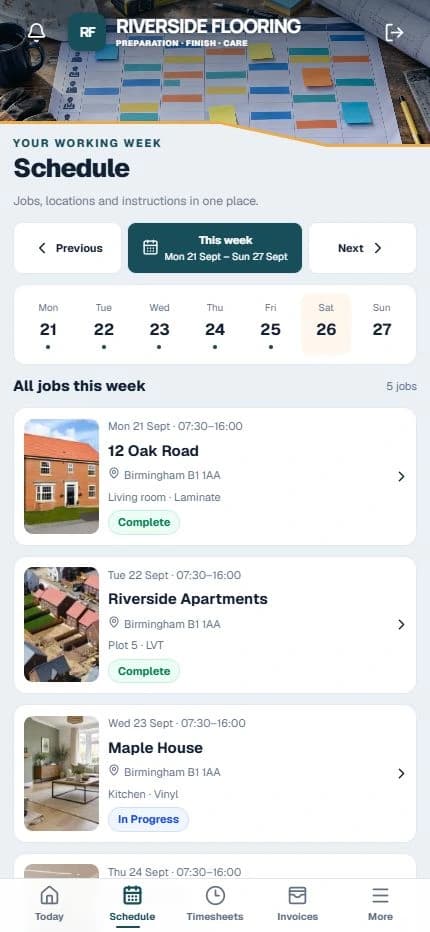
Real TradeCore worker schedule with fictional flooring contractors company data, jobs and work stages
See your jobs in one place.
Real TradeCore screen · illustrative company and job data.

Your flooring workflow

From the first stage to completion.

Plan, allocate and track each stage of the work. Keep notes, photos, workers and worker invoices connected so your team and office always have the latest information.

  1. 1Survey
  2. 2Subfloor preparation
  3. 3Moisture check
  4. 4Installation
  5. 5Trims & finishing
  6. 6Quality check
  7. 7Complete

An example workflow — your company can customise these stages to match its own process.

See how it works
Interior work area with finishing and preparation details
Keep the work and its records connected.

Know what’s ready before installation.

Keep subfloor preparation, moisture-check records, notes and photos connected to the job. From carpet, LVT and vinyl to laminate, wood and safety flooring, keep preparation connected to installation.

Common questions

Flooring Contractors FAQs

View all FAQs
Can I manage multiple properties and projects?

Yes. Keep domestic properties, commercial jobs and larger projects in one company workspace. All plans include unlimited sites.

Can I organise work by rooms or work areas?

Yes. Organise each property by rooms, plots or named work areas and keep allocations, progress, notes and photos together.

Can I allocate different fitters to different jobs or stages?

Yes. Allocate each fitter to the appropriate job, room and stage, including return visits.

Can I record subfloor preparation and moisture checks?

Yes. Use workflow stages, notes, issues and photos to record preparation and progress. TradeCore stores your records; it does not perform or validate technical moisture testing.

Can I store product details, layouts and client/job notes?

Yes. Keep supporting drawings, product information, measurements, specifications and notes with the relevant job or work area.

Can we track snags and outstanding issues?

Yes. Keep reported issues, notes and photos with the relevant work so your team can see what needs attention.

Can I use pricework as well as hourly or day work?

Yes. Connect the job or area to a pricework task, agreed price, completion, approval and worker invoice. Hourly and day work can run alongside pricework. Snag checklists and retention support review before releasing retained amounts.

Do workers need a laptop?

No. Workers can use TradeCore on their phone, with the same workspace available to office staff on desktop or tablet.

Does the free trial need a payment card?

No. Try TradeCore for 30 days with all features and your selected active-worker allowance. No card is required and the trial does not automatically charge you.

Still have a question?

We’re here to help. Get in touch and we’ll get back to you.

Contact us

Explore other solutions

One app, built for every trade.

Domestic & commercial

Jobs, properties and work areas.

New-build contractors

Sites, plots and teams.

All trades

See where TradeCore fits.

Pricework management

Approvals, worker invoices and retention.

Try it with your own team.

30 days free. No card required. All features included.

Start free trial Compare plans
TradeCore logoTRADECOREPLAN | MANAGE | DELIVER

Product

Product overviewFeaturesAccounting connectionsHow it worksPricingWho it’s forNew-build contractorsPricework management

Company

About usContactFAQsPrivacy policyTerms & cancellationFacebookInstagramYouTube

Get started

Start free trialCustomer loginSupportEmail support
© 2026 TradeCore. All rights reserved.PLAN | MANAGE | DELIVER
TradeCore logoTRADECOREPLAN | MANAGE | DELIVER

Product

Product overviewFeaturesAccounting connectionsHow it worksPricingWho it’s forNew-build contractorsPricework management

Company

About usContactFAQsPrivacy policyTerms & cancellationFacebookInstagramYouTube

Get started

Start free trialCustomer loginSupportEmail support
© 2026 TradeCore. All rights reserved.PLAN | MANAGE | DELIVER