Plan allocations
Schedule workers across your assigned sites and work areas. Keep worker names in view while moving through the calendar.

 TRADECOREPLAN | MANAGE | DELIVER
TradeCore for Contracts managers
Bring allocations, site updates and worker records into one place. Spend less time chasing information and more time keeping the work on track.
Built around your role
Switch between worker and site views to see the week clearly. Your company administrator assigns your sites and workers, keeping your view focused on the work you are responsible for.
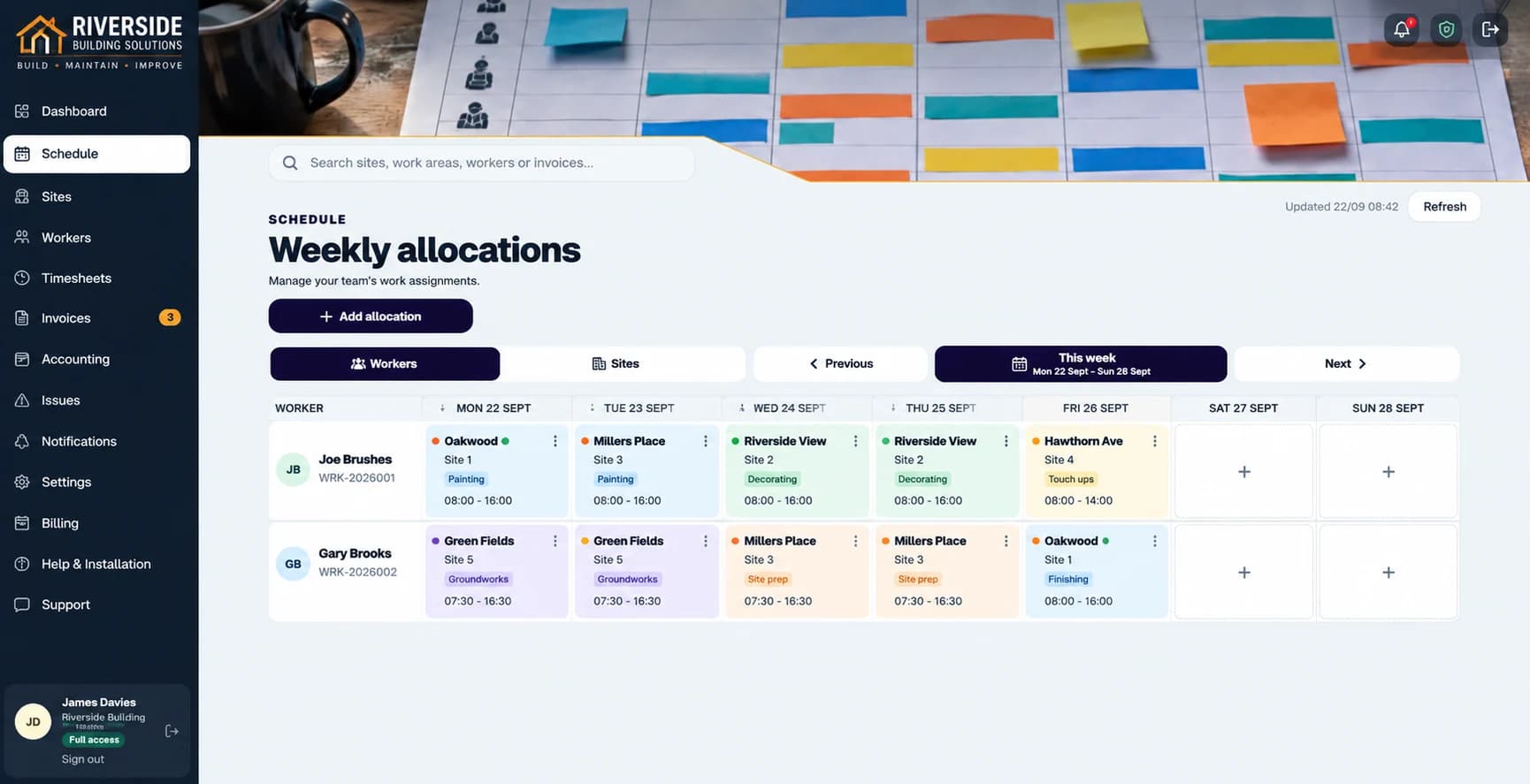
Schedule workers across your assigned sites and work areas. Keep worker names in view while moving through the calendar.
Create worker accounts as people join. Manage pay rates and worker records within your assigned access.
See holidays and sickness, then review affected allocations and arrange cover when plans change.
Manage progress, photos, notes and issues for the sites available to you. Keep updates with the work they relate to.
Review timesheets within your access, so daily records can be checked together instead of getting lost in a long list.
Review and approve invoices, view rates and record payments for assigned workers, subject to your company access.
Review holiday, sickness and affected allocations, then arrange cover. No worker is automatically reassigned.
Read the guide →Contracts managers work within assigned access. Administrator creation, administrator roles and access changes stay with a full-access administrator; company-wide settings are outside the contracts manager role.
Explore Sage and Xero connections →From plan to progress
Check sites, workers and availability.
Assign workers to jobs and work areas.
Follow progress, photos and issues.
Check timesheets and worker invoices.
Resolve issues and plan the next week.
Common questions
Your company assigns the sites and workers you manage. Available records and actions are limited to that scope; you do not automatically receive company-wide administration access.
Yes, within your assigned access. Use worker and site views to organise the week and add separate allocations when someone needs more than one job in a day.
Yes. Review availability and affected allocations, then arrange cover. TradeCore does not automatically choose a replacement worker.
Yes, within your permitted worker scope. Weekly groups keep daily time, location-check results and correction requests available for review.
Authorised managers can review records for assigned workers, including relevant rates, invoices and pricework. Company-wide accounting connections remain outside the restricted manager role.
Yes, for sites available to you. Records stay with the relevant work so you can investigate an outstanding stage or snag.
You can plan the work and stages available in your company’s workflow. The company can customise its stages to suit its work.
A full administrator can change your assigned sites and workers as responsibilities change.
No. Contracts managers work within assigned responsibilities. Creating administrators, changing administrator roles and company-wide settings remain with full-access administrators.
30 days free. No card required. All features included.